In short: to open your gate from anywhere, first decide how far away you will be. From close by, as you arrive, the Bluetooth of 1Control SOLO is enough: it copies the remote you already use and opens from the app, with no work on the motor. From the office or from holiday you add LINK to SOLO: it stays indoors, connects to 2.4 GHz Wi-Fi or an Ethernet cable and talks to SOLO over Bluetooth, with no SIM card.
The alternatives are a GSM module, a Wi-Fi relay wired to the control board, or the module sold by the maker of your motor. This guide compares the four solutions for gates and garage doors and lists what you need at home for remote opening to work. For the wider picture of using a phone in place of the remote, start from how to open a gate with a smartphone.
Opening a gate remotely or from close by: two different jobs
"Remotely" can mean twenty metres or two hundred kilometres. That is the first thing to settle, because the two cases need different technology.
- From close by (you are arriving home, sitting in the car at the gate, or standing in the garden): the phone talks directly to a device near the gate. With SOLO the connection is Bluetooth, typically within 15 to 20 metres, less if reinforced concrete walls are in the way. No internet is needed at the gate.
- From far away (you are at work, travelling, or at your holiday home): the phone cannot reach the gate. The command has to travel over the internet or the mobile network to a device that sits near the gate and operates it for you.
Many people buy a gate opener "with an app" and find out later that it only opens from close by. Before you buy, ask yourself one question: who needs to get in when I am not there? If the answer is "nobody", Bluetooth is all you need.
Wi-Fi or GSM gate opener, Bluetooth with a hub, maker's kit: the comparison
There are four ways to open from far away. They differ on two points: where the network has to reach, and what gets wired to the control board of the motor. The device types are explained in the smart gate opener guide.
GSM module: open with a phone call
A GSM module is a small box with a SIM card inside, wired to the control board. You call its number, the module recognises the caller and gives the opening pulse. It works anywhere with mobile coverage, even with no internet line. In exchange it needs an electrical connection on the control board, a SIM card that must stay active, and a list of authorised numbers that you keep up to date. The details are in the GSM gate opener guide.
Wi-Fi gate opener module: a relay on the control board
A Wi-Fi module is a relay connected to the command input of the control board and to your home network. You operate it from the module's own app. The weak point is the signal: the Wi-Fi must reach the motor reliably, and the motor is often at the end of the driveway or in a garage with a concrete ceiling. There is also the wiring on a board powered at 230 V, which is a job for an installer. A practical example is in Shelly for a gate or garage: wired relay or wireless.
Module or app from the maker of the motor
Several manufacturers sell their own module with an app: Came Connect, MyNice, BiSecur from Hörmann, maveo from Marantec. It makes sense if your motor is one of those it was designed for: compatibility depends on the model and the generation of the control board, not on the brand name on the gate. Check the manual of the motor or ask the installer.
Bluetooth with an internet bridge: SOLO + LINK
Here the internet stops inside the house. SOLO sits near the gate, copies the remote and sends the motor the same radio signal: nothing is connected to the control board. LINK stays indoors, plugged into a socket. It goes online over 2.4 GHz Wi-Fi or Ethernet and talks to SOLO over Bluetooth. It has no SIM card. When you send the command from the app, LINK receives it and passes it to SOLO. From close by you keep opening over Bluetooth, even when the home internet line is down.
| What changes | GSM module | Wired Wi-Fi relay | Maker's module | SOLO (Bluetooth) | SOLO + LINK |
|---|---|---|---|---|---|
| Opens from far away | Yes | Yes | Yes, if the motor supports it | No, only from close by | Yes |
| Network needed | Mobile coverage at the gate | Wi-Fi up to the motor | Depends on the model | None | 2.4 GHz Wi-Fi or Ethernet indoors |
| Wiring on the control board | Yes | Yes | Depends on the model | No | No |
| SIM card | Yes, must stay active | No | Depends on the model | No | No |
| Access for other people | List of phone numbers | Depends on the app | Depends on the app | Free shared access, with time slots | Free shared access, with time slots |
| If the home internet is down | Works: it uses the mobile network | Does not open from far away | Depends on the model | Opens over Bluetooth | Opens over Bluetooth from close by |
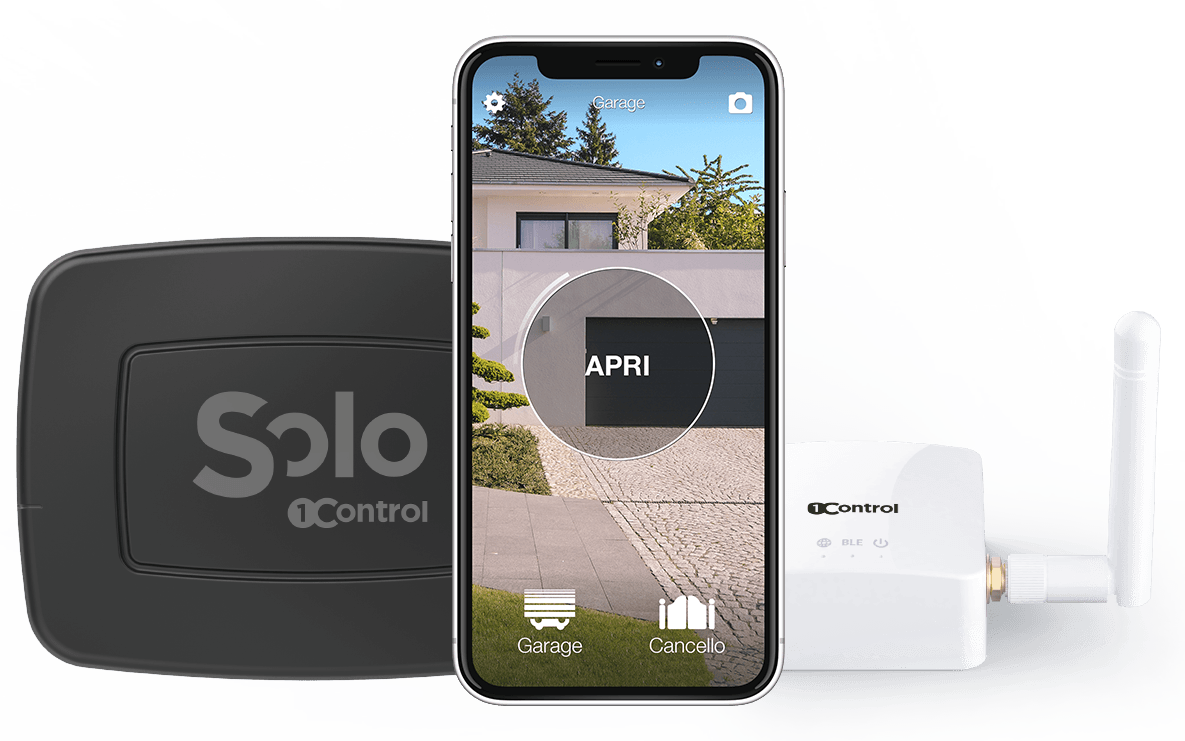
Open even when you are away: SOLO + LINK
SOLO copies your compatible remote and opens from your phone; LINK connects it to the internet over 2.4 GHz Wi-Fi or Ethernet, so you can open from anywhere. Check your remote model first. One-off purchase, no subscription.
228,00€ 159,00€ VAT included
- 1,500+ reviews on Amazon, Facebook and Trustpilot
- Secure payments
- 2-year warranty
Black Friday at 1Control: deals until 27/11. See the deals →
SOLO + LINK: what you need at home to open remotely
LINK is a bridge, not a gate opener: on its own it opens nothing. And SOLO on its own does not open from far away. For remote opening you need both, plus three connections worth checking before you buy.
- A power socket. LINK is powered by the USB adapter in the box. It is not weatherproof: keep it in a dry place, in the house or in the garage.
- Internet. 2.4 GHz Wi-Fi (a mixed 2.4 and 5 GHz network is fine; a 5 GHz-only network is not) or an Ethernet cable to the router.
- Bluetooth to SOLO. LINK must be within about 25 metres of SOLO in a straight line; walls and reinforced concrete shorten the range.
The right place for LINK is the one that reaches both well: the router and the gate. Next to the router is not always the best choice if three walls stand in between. If the gate is far from the house, there is an optional outdoor antenna with a 5 to 20 metre cable that brings the Bluetooth signal closer to the gate. In that case connect LINK to the router with an Ethernet cable, because the same antenna also serves the Wi-Fi.
One LINK handles up to 5 1Control devices. SOLO itself runs on batteries (two C batteries are already fitted and last about two years at around ten openings a day), is rated IP66 and controls up to 4 automations: driveway gate, garage door, barrier.
Two limits to know about. First-generation SOLO units, the ones that use the old "1Control SOLO" app, cannot be connected to LINK. Neither can SOLO AUTO, the version that stays in the car.
Which solution to choose for a gate or garage door, case by case
- A home with internet and a working remote. SOLO + LINK: no work on the motor, no SIM card.
- You only need to open when you arrive. SOLO on its own. You can add LINK later without changing anything.
- A holiday home, a plot of land or a garage with no internet line. Here LINK has no network to connect to. The GSM module remains, with its SIM card and its wiring on the control board.
- The remote cannot be copied, or you no longer have one that works. The way is SOLO + KIT: a small receiver wired to the push-button input of the control board (START or step-by-step), like one more push button. The cables are in the box and you can connect it yourself; for the right terminals, look at the manual of the motor. To open from far away you still add LINK.
- A shared gate in an apartment building. To fit a module on the shared system you need the consent of the building management. SOLO copies your own remote and does not touch the system.
- A recent motor designed for the maker's module. Then the maker's app is the direct route. Just check how it handles access for other people.
Before you choose SOLO, look up the model code of your remote (it is on the back or inside the battery compartment; the name of the motor is not enough) in the compatibility checker. It tells you whether the model can be copied, whether you need the SOLO BS version for Hörmann BiSecur remotes, or whether you need the KIT. The most common brands have their own pages: Came, Nice and FAAC for gates, Hörmann for garage doors.
Letting in a courier, a relative or the gardener while you are away
When you are not at home, there are two ways to let someone in.
The first is to open it yourself from the app, through LINK, when the courier rings or the plumber calls you from the gate.
The second is to share access. In the app you choose the person's phone number, the gate or garage door, the start date, the end date and the time slots. The person installs the 1Control app, registers with that number and opens on their own, over Bluetooth, at the gate. Shared access is free and you can remove it whenever you want, with no remote to collect; administrators see in the history who opened. A standard SOLO can be used by up to 10 users. For anyone who comes every week, shared access is almost always the better choice, and it does not even need LINK. More in share gate access with family.
Checking remotely whether the gate or garage door was left open
Opening from far away and knowing whether the gate has closed again are two different pieces of information. To see the open or closed state in the app you need the Sensor SOLO: a small battery-powered sensor, rated IP67, that sticks to the gate with adhesive tape and has no wires. It works only together with SOLO and LINK (the white, second-generation LINK): LINK reads the sensor and sends the notification when the gate opens or closes. Notifications go to administrators. For a garage door, see garage door left open? Check it and get alerts.
Remote opening with Alexa, Google Home, Siri and CarPlay
LINK also brings voice commands. Alexa and Google Home require SOLO + LINK; with Google the command goes through Google Assistant and the Google Home app, not through Gemini. Setup is covered in voice assistants and gates. Siri works with Shortcuts: with SOLO alone while the iPhone is within Bluetooth range, and with LINK from far away too.
In the car, the 1Control app for CarPlay and Android Auto requires SOLO + LINK. The alternative is SOLO AUTO, which travels in the car and does not use LINK: it opens when you arrive, not from another city. The comparison is in open your gate with CarPlay. The app is also available for Apple Watch and for Wear OS watches.
One thing that does not exist: automatic opening as you approach. The 1Control app does not use your location and never opens by itself. You always give the command.
Test remote opening before you rely on it
Set up local opening first: copy the remote by following the app, fix SOLO near the gate, test over Bluetooth. Then connect LINK and run the real test with the phone outside Bluetooth range. In the app, the remote command is the horizontal slider; the round button opens over Bluetooth.
The first time, ask someone to watch the gate. And keep one remote as a backup.
Frequently asked questions
Can I open my gate remotely without Wi-Fi at the gate?
Yes, with SOLO + LINK. The Wi-Fi, or the Ethernet cable, only has to reach LINK, which stays in the house. From LINK to the gate the connection is Bluetooth, within about 25 metres in a straight line. A Wi-Fi relay wired to the control board, on the other hand, needs Wi-Fi right at the motor.
Is a Wi-Fi or a GSM gate opener better?
It depends on the network you have. If there is internet at home, SOLO + LINK opens from far away with no SIM card and no wiring on the control board. If there is no line on site, as in a holiday home, the GSM module remains: it uses the mobile network and is wired to the motor.
Does LINK need a SIM card?
No. LINK has no SIM card and no connection of its own: it uses the home internet line, over 2.4 GHz Wi-Fi or Ethernet. That is the main difference from a GSM module.
Does SOLO alone open the gate from far away?
No. SOLO alone opens over Bluetooth, with the phone near the gate, typically within 15 to 20 metres. To open from another city you also need LINK, powered and connected to the internet.
If the internet is down, does the gate still open?
At the gate, yes: opening over Bluetooth with SOLO needs no internet. Opening from far away through LINK depends on the internet line at home. Keep one remote as a backup.
Can I open the garage door remotely with the same system?
Yes. SOLO copies up to 4 remotes, even from different brands: the gate and the garage door can share one device if they are close to each other, and with LINK you open both from far away. If they are far apart you need two SOLO units; one LINK handles up to 5 devices, as long as it reaches them over Bluetooth.
The bottom line
Gate or garage door, the choice comes down to two questions: is there internet at home, and can someone work on the control board? With a home line and a remote that can be copied, SOLO + LINK opens from anywhere with no work on the motor and no SIM card. With no line on site, the GSM module remains. If you only need to open when you arrive, SOLO is enough.
The first step is the same for everyone: take your remote, read the model code and look it up in the compatibility checker. Then choose the spot in the house from which LINK reaches both the router and the gate.